


A website can look perfectly good at first glance while still hiding problems that affect its search visibility, mobile behaviour or user experience.
An overly long page title, an incorrect H1, images without alternative text, elements overflowing the screen or an inappropriate technical configuration are all relatively easy to overlook during website development.
At Faro Digital Media, we wanted a fast way to check these things directly on the webpage we were viewing in the browser.
That led us to create FARO Website Inspector, our own Google Chrome extension.
What is FARO Website Inspector?
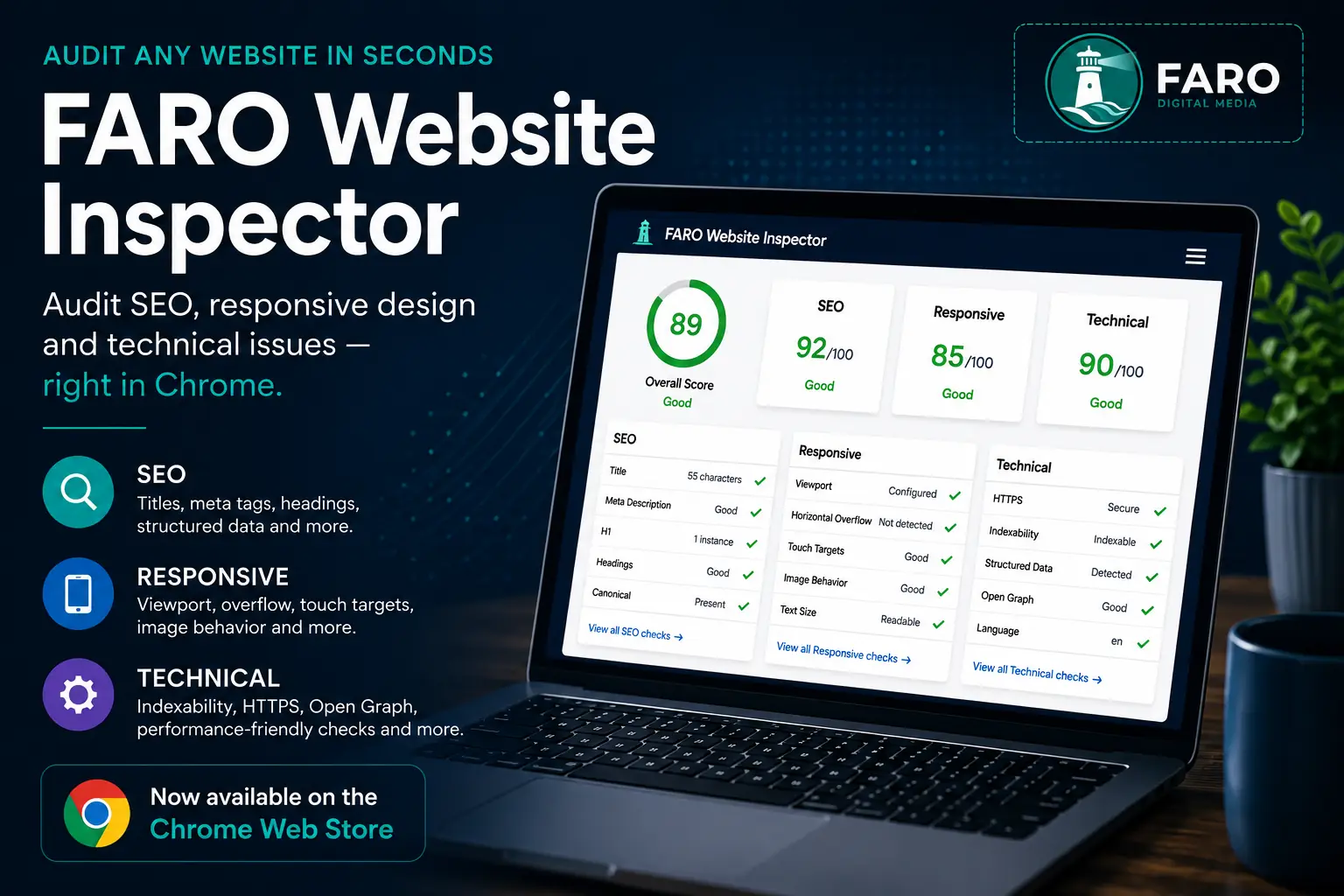
FARO Website Inspector is a website auditing tool that analyses the page currently open in Chrome and immediately evaluates different aspects of its SEO, responsive design and technical implementation.
The concept is simple: visit a webpage, open the extension and quickly identify potential issues that deserve further investigation.
It is not intended to replace a comprehensive SEO audit or specialised tools such as Google Search Console or PageSpeed Insights. Its purpose is different: to provide a fast inspection of the page actually rendered in the browser.
This can be particularly useful on modern websites where JavaScript, animations and dynamic content mean that what the user ultimately sees may differ from the initial HTML delivered to the browser.
What does it check?
FARO Website Inspector divides its results into three principal areas: SEO, Responsive and Technical, as well as providing an overall score.
- Page title and title length.
- Meta description.
- Presence and content of the H1.
- H1, H2 and H3 heading structure.
- Canonical URL.
- Indexability.
- JSON-LD structured data.
- Image
altattributes. - Internal and external links.
- HTTPS.
- Open Graph metadata.
- Viewport configuration.
- Potential horizontal overflow.
- Oversized page elements.
- Interactive element sizes.
- Excessively small text.
- Responsive image behaviour.
- Declared document language.
Checks are classified according to their significance so the inspector can distinguish between a genuine problem, a warning and information worth displaying without necessarily reducing the score.
Not everything detected by an automated tool is necessarily a problem
This has been one of the most important aspects of developing the extension.
Detecting a condition with JavaScript is relatively straightforward. Interpreting that condition correctly is much more difficult.
For example, an auditing tool may discover numerous links or buttons that do not meet a recommended touch-target size. On a mobile phone, that could represent a significant usability issue.
Automatically penalising those same elements while inspecting a page from a 1440-pixel desktop viewport, however, can produce a misleading score.
Images present similar challenges. An image can have intrinsic dimensions greater than the viewport while still being correctly contained or clipped by CSS without creating horizontal scrolling.
There is also an important distinction between an image that is missing an alt attribute and a deliberately decorative image using alt="".
FARO Website Inspector therefore aims to do more than simply count elements. We try to include enough context to make the results useful.
Testing it against the real web
An auditing tool can work perfectly on a simple webpage and behave very differently when confronted with a complex site.
During development, we therefore tested FARO Website Inspector not only against our own website but also against large public websites including Amazon and Yahoo.
Those tests exposed several interesting edge cases.
Earlier versions, for example, could penalise desktop pages too heavily for touch-target sizes. The extension was detecting the dimensions correctly, but the conclusion did not sufficiently account for viewport context.
We changed that behaviour so the information remains visible on desktop while being treated as informational, reserving the scoring penalty for situations where it is genuinely relevant.
We also refined image analysis to avoid automatically treating an image as problematic simply because its dimensions exceed the viewport when the site layout correctly contains it.
It is this kind of real-world testing that has gradually turned a basic inspector into a much more useful diagnostic tool.
What do the scores mean?
FARO Website Inspector provides an overall score alongside individual SEO, Responsive and Technical scores.
However, a score of 100 does not mean that a website is perfect.
It means that within the checks performed by FARO Website Inspector, no significant issues have been detected that reduce that score.
A page's position in Google depends on many other factors, including content quality and relevance, authority, backlinks, search intent, competition, performance and user experience.
Likewise, an automated tool cannot determine on its own whether a website communicates a compelling value proposition or whether it will successfully convert visitors into customers.
The inspector should therefore be viewed as a rapid diagnostic tool, not an absolute certification of website quality.
Inspecting the page the user actually sees
An important characteristic of FARO Website Inspector is that it analyses the rendered state of the webpage in the active browser tab.
This allows the extension to inspect elements and properties after the browser has processed the page.
To do this, the extension uses Chrome's activeTab and scripting permissions.
activeTab provides temporary access to the tab that the user has chosen to inspect.
scripting allows the analysis code packaged within the extension to run on that page.
The inspection only begins when the user invokes the extension.
Privacy by design
We also wanted the tool to remain as straightforward as possible from a privacy perspective.
Page analysis and audit results are processed locally in the browser.
FARO Website Inspector does not send inspected page content, audit results or the user's browsing history to Faro Digital Media's servers.
The extension also does not use remote code. The JavaScript required to perform the analysis is included within the extension package itself.
Read the dedicated FARO Website Inspector Privacy Policy for more information.
From an internal tool to a public extension
FARO Website Inspector started with a simple requirement: we wanted to review the pages we were working on quickly without manually checking every individual element.
During development, however, it became clear that the tool could be useful to many other people.
Developers, web designers, SEO professionals, marketers and website owners can all use the inspector to perform an initial review in seconds.
So we decided to turn it into a public extension.
Now available on the Chrome Web Store
FARO Website Inspector was developed by Faro Digital Media in Madrid and is now published and available to install from the Chrome Web Store.
Version 1.0.0 is now publicly available and can be installed directly from its official listing.
Install FARO Website Inspector from the Chrome Web Store
FARO Website Inspector v1.0.0 is now publicly available for Google Chrome.
Found problems with your website?
Finding a problem is only the first step.
If FARO Website Inspector identifies technical, SEO or mobile issues on your website—or your site is receiving visitors but is not producing the results you expected—we can perform a more detailed analysis.
At Faro Digital Media, we design and develop bespoke websites and help businesses improve their digital presence, SEO and user experience.